Excalidraw Extension
🎥Plug & Play
Watch the demo
This tutorial covers how to add the Excalidraw MCP App as a goose extension that enables goose to draw hand sketched Excalidraw diagrams in real time.
Quick Install
- goose Desktop
- goose CLI
Add a Remote Extension (Streaming HTTP) extension type with:
Endpoint URL
https://excalidraw-mcp-app.vercel.app/mcp
Configuration
These steps configure the Remote MCP Server. For other deployment options, see the Excalidraw MCP App documentation.
- goose Desktop
- goose CLI
- Launch the installer
- Click
Yesto confirm the installation - Click the button in the top-left to open the sidebar
- Navigate to the chat
- Run the
configurecommand:
goose configure
- Choose to add a
Remote Extension (Streamable HTTP).
┌   goose-configure
│
◇  What would you like to configure?
│  Add Extension
│
◆  What type of extension would you like to add?
│  ○ Built-in Extension
│  ○ Command-line Extension
│  ● Remote Extension (Streamable HTTP) (Connect to a remote extension via MCP Streamable HTTP)
└
- Give your extension a name.
┌   goose-configure
│
◇  What would you like to configure?
│  Add Extension
│
◇  What type of extension would you like to add?
│  Remote Extension (Streamable HTTP)
│
◆  What would you like to call this extension?
│  Excalidraw
└
- Enter the Streamable HTTP endpoint URI.
┌   goose-configure
│
◇  What would you like to configure?
│  Add Extension
│
◇  What type of extension would you like to add?
│  Remote Extension (Streamable HTTP)
│
◇  What would you like to call this extension?
│  Excalidraw
│
◆  What is the Streamable HTTP endpoint URI?
│  https://excalidraw-mcp-app.vercel.app/mcp
└
- Enter the number of seconds goose should wait for actions to complete before timing out. Default is
300seconds.
┌   goose-configure
│
◇  What would you like to configure?
│  Add Extension
│
◇  What type of extension would you like to add?
│  Remote Extension (Streamable HTTP)
│
◇  What would you like to call this extension?
│  Excalidraw
│
◇  What is the Streamable HTTP endpoint URI?
│  https://excalidraw-mcp-app.vercel.app/mcp
│
◆  Please set the timeout for this tool (in secs):
│  300
└
- Enter a description for this extension.
┌   goose-configure
│
◇  What would you like to configure?
│  Add Extension
│
◇  What type of extension would you like to add?
│  Remote Extension (Streamable HTTP)
│
◇  What would you like to call this extension?
│  Excalidraw
│
◇  What is the Streamable HTTP endpoint URI?
│  https://excalidraw-mcp-app.vercel.app/mcp
│
◇  Please set the timeout for this tool (in secs):
│  300
│
◆  Enter a description for this extension:
│  Excalidraw MCP App for diagramming
└
- Choose
Nowhen asked to add custom headers.
┌   goose-configure
│
◇  What would you like to configure?
│  Add Extension
│
◇  What type of extension would you like to add?
│  Remote Extension (Streamable HTTP)
│
◇  What would you like to call this extension?
│  Excalidraw
│
◇  What is the Streamable HTTP endpoint URI?
│  https://excalidraw-mcp-app.vercel.app/mcp
│
◇  Please set the timeout for this tool (in secs):
│  300
│
◇  Enter a description for this extension:
│  Excalidraw MCP App for diagramming
│
◆  Would you like to add custom headers?
│  No
│
└  Added Excalidraw extension
Example Usage
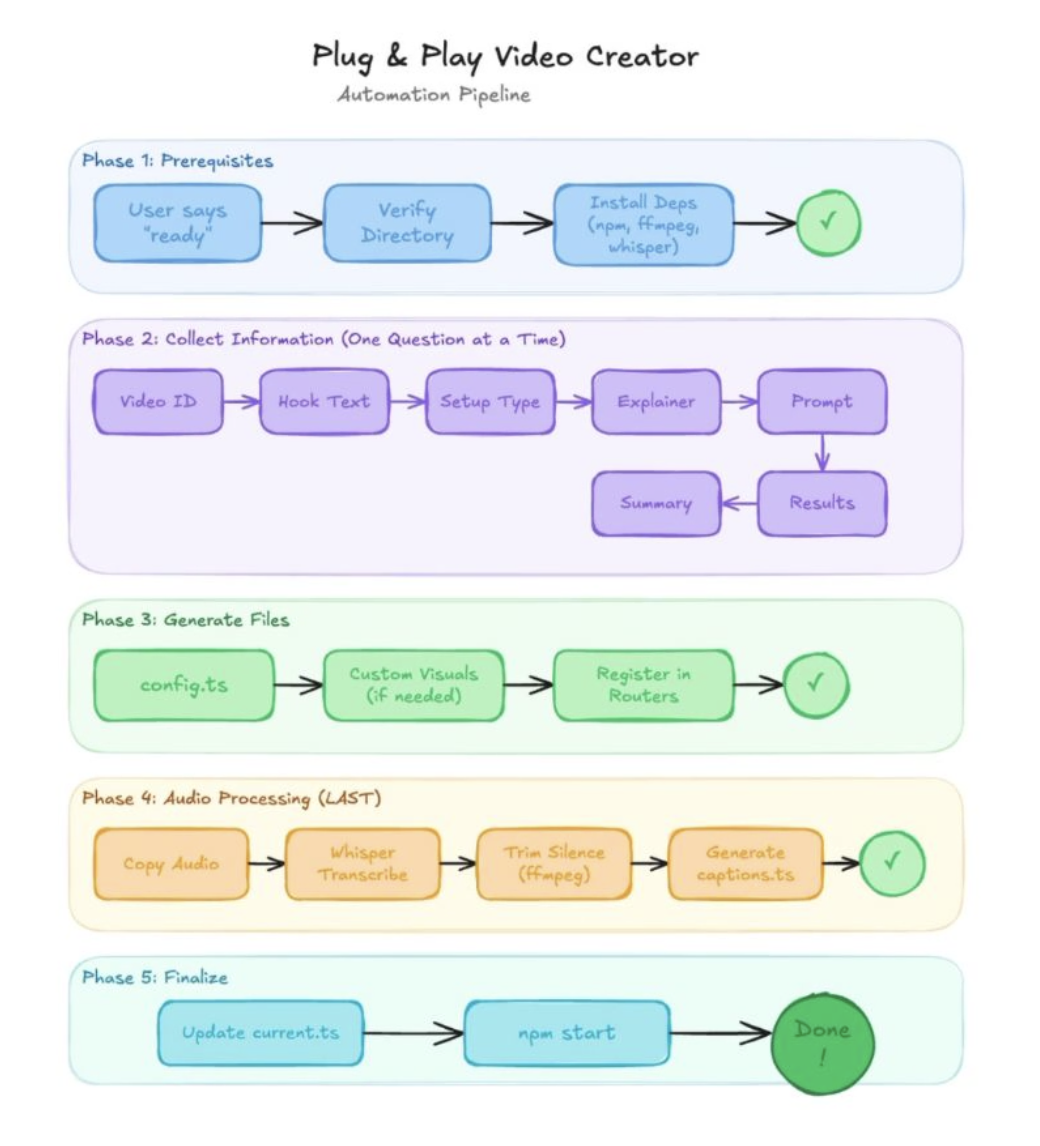
In this example, we use the Excalidraw MCP App to have Goose visualize its own automation pipeline in real time. This demonstrates how Goose can connect to live tools, reason about workflows, and generate structured diagrams element by element.
goose Prompt
Hey Goose review my video automation recipe and create a visual of the automation pipeline for me. I want clean lines and clear labels.
goose Output
─── reading /Users/ebonyl/Desktop/plug-and-play-video.yaml ──────────────────────────

─── Create View elements: [ {"type":"cameraUpdate","width":600}, ...] ──────────────────────────