Summon Extension
The Summon extension lets you load knowledge into goose's context and delegate tasks to subagents.
You can load different types of sources:
- Skills - Reusable instruction sets that teach goose specific workflows
- Recipes - Automated task definitions with prompts and parameters
This is useful for teaching goose how to perform tasks and running work in parallel through subagents.
info
This extension is available in v1.25.0+.
Configuration
Platform Extension
This is a built-in platform extension that's enabled by default for new users. Platform extensions provide core functionality and are used within goose just like external MCP server extensions.
- goose Desktop
- goose CLI
- Click the button in the top-left to open the sidebar
- Click
Extensionsin the sidebar - Toggle
Summonon
- Run the
configurecommand:
goose configure
- Choose to
Toggle Extensions
┌   goose-configure
│
◇  What would you like to configure?
│  Toggle Extensions
│
◆  Enable extensions: (use "space" to toggle and "enter" to submit)
│  ● summon
└  Extension settings updated successfully
Example Usage
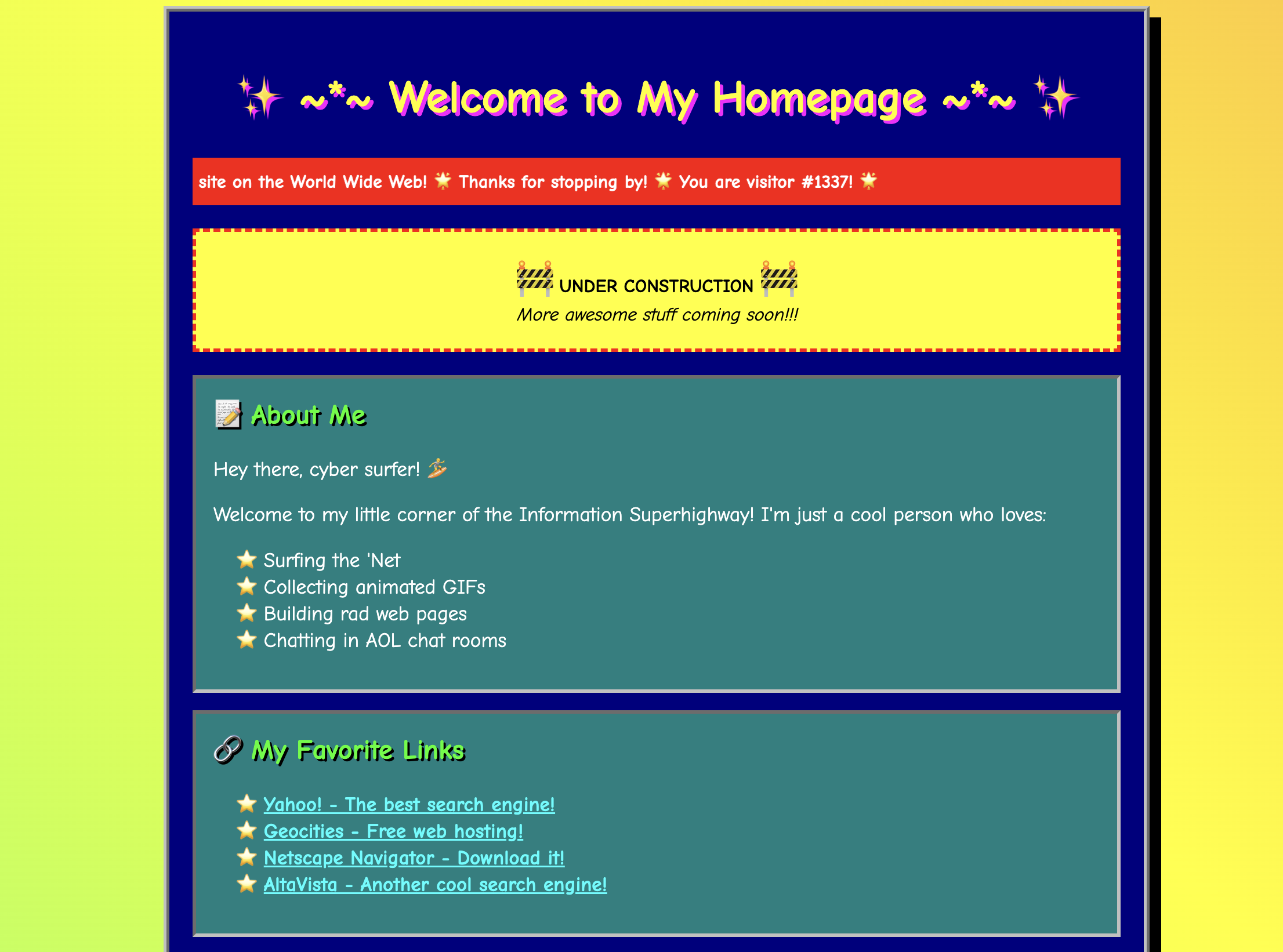
In this example, we'll create a custom skill that teaches goose a 90s web aesthetic, then use Summon to load that skill and delegate a subagent to build a retro homepage.
Create a Skill
.agents/skills/retro/SKILL.md
---
name: retro
description: Creates content with 90s web aesthetic
---

# Retro Web Guidelines

Channel the 90s internet:
1. Bright colors, especially neon
2. Comic Sans or pixel fonts
3. Animated GIF energy (use emojis as a substitute)
4. "Under construction" vibes
5. Visitor counters, guestbook mentions
6. Marquee-style excitement
goose Prompt
Load the retro skill with summon. Then delegate a subagent to create an HTML page called my-site.html for a personal homepage.
goose Output
─── load | summon ───────────────────────────────────────────
source: retro

# Loaded: retro (skill)

## retro (skill)

Creates content with 90s web aesthetic

### Content

# Retro Web Guidelines

Channel the 90s internet:
1. Bright colors, especially neon
2. Comic Sans or pixel fonts
3. Animated GIF energy (use emojis as substitute)
4. "Under construction" vibes
5. Visitor counters, guestbook mentions
6. Marquee-style excitement

---
This knowledge is now available in your context.


─── delegate | summon ───────────────────────────────────────
instructions: Create an HTML file called my-site.html for a personal homepage
using the 90s web aesthetic...

I've created your 90s-style personal homepage at `my-site.html`! 🌟

The page includes all the classic retro web elements:

- **Marquee tags** - Scrolling welcome message and bouncing text
- **Neon colors** - Hot pink, lime green, cyan, yellow on a navy blue background
- **Comic Sans font** - The quintessential 90s typeface
- **Visitor counter** - You're visitor #001337 with a blinking effect
- **"Under Construction" section** - With 🚧 emojis
- **About Me box** - With neon border styling
- **Favorite Links table** - Classic link collection
- **Guestbook section** - Sign and view options
- **Retro badges** - "Best viewed in Netscape Navigator 4.0"
- **Lots of emojis** - 🌟✨💫🔥⭐🌈🎉 throughout

Open it in your browser to experience the full nostalgic glory! 🎉
Results