Report Gallery
Every Trailblaze run produces a rich, replayable session. The reports below are not
mockups — they are generated automatically by Trailblaze’s own CI on each push to
main, exported straight from the example and showcase trails in this repository and
embedded here by the docs build — one per platform (Android, iOS, web). What you see is
exactly what your agent or CI produces locally with trailblaze report.
Three export formats are shown for each trail:
- Storyboard — a single-frame grid tiling every step’s screenshot, labeled with the
tool that ran. A glance-overview of the whole flow. (
trailblaze report --storyboard) - Timeline (animated WebP) — the report’s timeline autoplay, scrubbing through each
step with its labels and annotations. The animated walkthrough.
(
trailblaze report --webp) - Interactive report — the full self-contained HTML report: per-step screenshots, view-hierarchy snapshots, recorded tool calls, and (when an LLM was involved) the transcript. This is the same Trace Viewer surface the desktop app shows.
These are live artifacts
The WebP and storyboard below link through to the report viewer, which loads each run from the session archive CI published — click either image to open it. Embedding a report inline doesn’t do it justice, so the animations link out to the real thing. Each run also offers its self-contained HTML report: one file you can save, open offline, or attach to a PR.
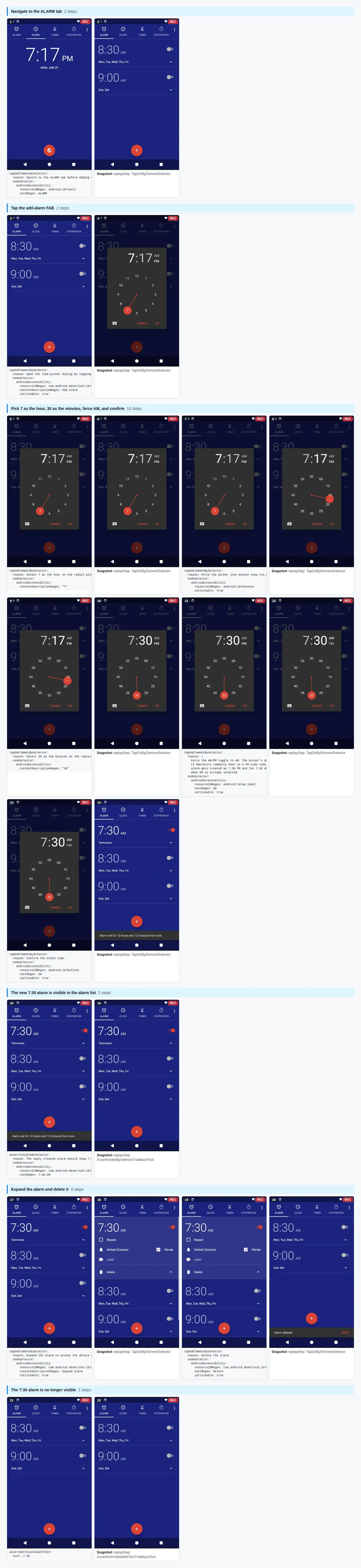
Set an alarm (Android)
A recorded Android trail driving the system Clock app to set a 7:30 AM alarm, replayed on
an emulator via Trailblaze’s host-RPC Android driver — no LLM at replay time. Source:
trails/clock/set-alarm-730am.
Storyboard
Timeline

Open this run in the report viewer →
or open the self-contained report file — one HTML file, no network.
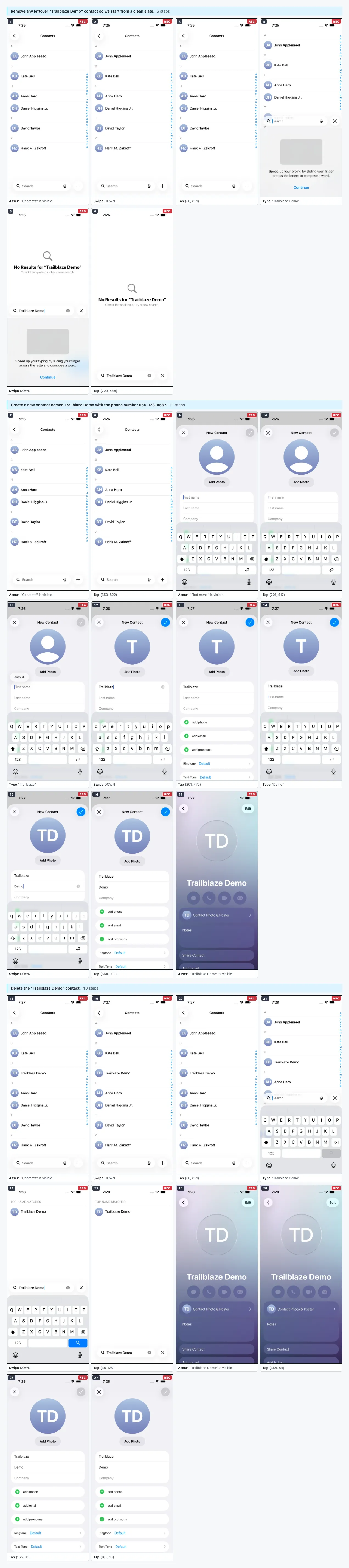
Contacts (iOS)
A recorded iOS trail driving the system Contacts app through a full create→verify→delete
lifecycle — creating a “Trailblaze Demo” contact with a phone number, confirming it landed
in the list, then deleting it — replayed on an iOS simulator with no LLM at replay time.
Source: trails/ios-contacts/test-create-then-delete.
Storyboard
Timeline

Open this run in the report viewer →
or open the self-contained report file — one HTML file, no network.
Wikipedia (web)
A recorded web trail driven through Playwright against live en.wikipedia.org — no
Android emulator or iOS simulator required, and no LLM at replay time. Source:
examples/wikipedia.
Storyboard
Timeline
Open this run in the report viewer →
or open the self-contained report file — one HTML file, no network.
Open one of your own sessions in the browser
Every run above opens through that same viewer: the gallery publishes each session’s .zip
next to its images and links ?zip= at it, so those pages are the viewer doing exactly what
it does for your own archives. If what you have is a session archive of your own — the
.zip a run leaves behind, or one downloaded from CI — nothing needs exporting either:
Drop the .zip files on that page (or use its file picker) and every log, screenshot, LLM
call, and step timeline in them renders as a full interactive report. This is the
path that always works: the archive is read in your browser, nothing is uploaded, and no
request leaves the page. It works offline, and on an archive you’d never put on a network.
The viewer is one self-contained file — the same stylesheet and the same renderer an exported report carries, with no run baked into it. It also carries the selector engine, so Inspect UI computes the same ranked selector suggestions here as it does in an exported report: the daemon’s own generator and resolver compiled to JavaScript, not a re-implementation. So it can’t drift from the reports it renders, and you can host or keep your own copy:
trailblaze viewer --output out/index.html # serve it anywhere, or just open it
The viewer is bundled into the CLI, so that command is a file copy — no build, no bun, no
source checkout. The copy you get is the one that binary was built with, which is the point: a
viewer built separately drifts from the renderer, and then a report link renders a run with
different report code than generated it.
Building it from source is only for working on the viewer, from a checkout of this repo:
./scripts/build-viewer-shell.sh out # writes out/index.html
Loading by URL (?zip=), and when it works
Appending ?zip=<archive-url> (or pasting a URL into the viewer’s field) loads an archive
over the network instead, which is what makes a report shareable as a link. Viewer
route params ride alongside it, so a link can open on a specific place in the report:
.../report-viewer/?zip=https://example.com/runs/my-session.zip&tab=lightbox
Whether this works depends on where the archive is served from:
- Same origin as the viewer — no CORS involved at all, so it always works. That’s how
the gallery runs above are wired: their
?zip=values are relative paths to archives published beside the viewer on this site. - Any other host — the fetch is cross-origin, so it’s opt-in on the archive host’s
side: it only works if whatever serves the
.zipsends anAccess-Control-Allow-Originheader permitting the viewer’s page. Plenty of artifact stores don’t, and that’s not something the viewer can work around — the browser blocks the read before the page sees any bytes. When it happens, the viewer says so and you can still drop the file.
Several archives, one report
The viewer holds a list of archives rather than a single field, and renders everything on it as one report. Add lines a URL up without rendering it; dropping or picking files adds them to what is already there and renders the whole list at once. Each row can be taken back out — so a URL from CI and a file off your own disk can sit in the same list, which no text field could express.
A list of URLs is still a link: repeat the parameter, one archive per run.
.../report-viewer/?zip=<android-phone.zip>&zip=<ios-ipad.zip>
The sessions concatenate in list order, so the report’s run index, device matrix, and Trail view light up exactly as they would for one multi-session archive — which is what turns runs of the same trail on several devices into one side-by-side comparison. A list holding a local file has no address to share, so it renders in place and Share stays off.
A build’s worth of runs: the run index
An exported report carries its runs’ evidence inside itself, which stops scaling somewhere around a few dozen screenshot-dense runs. A CI build that runs hundreds of trails across several devices is well past that: embedding them produces a file measured in hundreds of megabytes, too big for most artifact stores to keep and too big for a browser to open. The result is a build with no viewable report at all.
The generateRunIndex task produces the other half of that report instead — the index,
with no evidence in it. It reads the test_report.json files a run already writes and emits
one stub per result row, so what you get is the familiar matrix: a row per trail, a column
per device classifier, each cell showing outcome and duration. Every cell links out to that
run’s own session archive, opened through the viewer with ?zip=:
./gradlew :trailblaze-report:generateRunIndex --args="\
  reports/summary-android/test_report.json reports/summary-ios/test_report.json \
  --viewer-base-url https://reports.example/viewer/index.html \
  --output trailblaze_report_index.html"
It’s a build task rather than a trailblaze subcommand because its input is a CI artifact:
it runs where the results files land, beside generateTestResultsArtifacts, not on the
machine that drove the device.
Rows from every file passed share one matrix, so a build’s per-device shards and a nightly’s several configs collapse into a single index. Its size tracks the number of tests, not the number of screenshots — a few hundred runs come out around half a megabyte, most of which is the viewer script.
--viewer-base-urlis where you host the viewer shell (build-viewer-shell.shabove). Each cell appends?zip=<the run's archive URL>to it. Host the shell on the same origin as the archives and no CORS configuration is involved.- Omit it, or omit an archive URL from a row, and that cell still renders its outcome — it just isn’t clickable. Nothing links to a viewer with no archive to load.
- Numbers the index can’t know are shown as unknown rather than zero. A stub has no calls to
count, so LLM cost and call count come from the results file when it carries them, and tool
counts and token totals read
—.
Comparing runs: Replay and Grid
A report can put several runs on one stage, as lanes side by side — the same trail across devices, a retry beside the run it followed, or any two runs you want to look at together. Two projections read across those lanes rather than down one run:
- Replay plays every lane back on one shared wall clock.
- Grid lays the lanes out as a matrix, one column per run and one row per step. Its Strip
switch turns it into a gallery: each run’s header over a row of its screenshots, one per step,
scrolling sideways under a pinned row of step text (a single run captions each screenshot
instead). A step sits in the same column for every device. Embedded with
chrome=none, the strip is the whole frame: no loader bar, tabs, toolbar or run footer.
They live in two places, depending on what you are looking at:
- On a run’s own report, as tabs beside Timeline, scoped to that run’s trail. A run that ran on three devices shows three lanes there; a run that ran once shows one — its Replay is still the point. The tabs are absent for a run with nothing to stage: one that was skipped, and one whose report is only a link out to another.
- In the Compare workspace, for a set of runs you assembled yourself. Each index row and matrix cell carries a checkbox: tick any runs and open them together, whether or not the report groups them. A run index row whose trail ran on more than one device opens that trail’s runs the same way, in one click. Compare’s Screens tab is the Grid — for a pick of exactly two runs it is the side-by-side screen diff instead — and its Replay tab is the same playback.
What a row of the stage MEANS depends on what you picked:
- One trail’s runs line up on the trail’s authored steps, so row 3 is step 3 on every lane and reading across a row compares the same step. A lane that never reached it says so.
- Runs of different trails have no shared step to line up on, so a row is simply each lane’s own k-th step: rows carry no shared label, and each cell keeps its own wording.
The stage travels in the URL, so it can be shared or reloaded: ?run=2&tab=replay (or tab=steps
for the Grid, and tab=steps&layout=strip for its strip) for a run’s own trail, ?view=compare&pick=0,2,5 for a set you picked.
The indices are positions in that report — a report regenerated with different runs opens on
whichever of them it still has, or falls back to the run index. Links written when the projections
were a page of their own (?view=trail&…) still land on the same thing, and links to the retired
Map tab (tab=map, mode=map) open the Grid.
Comparing across reports
Comparing needs two runs, and a report holding one run has nowhere to get the second. The daemon solves this for the page it serves per session: that page’s Compare is a link into the daemon’s report over every session, opening on the run you were reading. The run is named by its session id rather than its position, because positions renumber as new runs land. If the all-runs report turns out not to hold that run, the view says so instead of quietly comparing two others, and offers a link that retries over every run the daemon holds — still naming both runs by id, since the address you are looking at by then has been rewritten in positions.
That retry appears only when the daemon told this document a wider report exists, and the daemon says so only when the wider report would really add runs. The page never guesses it from its own address, so a report you download — or re-host on a build server, where the address still looks live — offers no retry. It is a fixed set of runs however you ask for it. The retry is also the most expensive report the daemon builds, which is why the link says so.
The daemon’s all-runs report covers its 25 most recent sessions by default, which is also the cap
on how much work one request can ask for. Add ?limit=all to go further back — the Compare link
adds it for you when the run you came from is older than that window — or ?limit=<n> for a
specific number.
Two runs that merely share a title are never treated as one trail. Only an explicit trail id coalesces runs, because two runs named the same can be unrelated histories — the run index takes the same position, and staging them as one comparison would contradict the rows you clicked from.
Trails that never ran: the Skipped section
A trail whose skip: resolves a reason for the device it was handed to is held back before a
session opens. Nothing runs, so nothing is logged, and a report built from logs alone cannot tell a
trail that was deliberately held back from one nobody ever wrote. Coverage quietly shrinks and the
report still reads as green.
So the runner records what it declined to run. When it honors a skip it writes a small record beside
the session logs, in <logs-dir>/skipped/, naming the trail, the device the skip resolved for, and
the reason. Both halves of the report read it back:
- The HTML report gains a fourth index section, Skipped, after Failed, Self-healed and Passed. Each row states its reason and has nothing to open. On a multi-device matrix the trail keeps its own row: a dashed, unfilled cell on the device that skipped it, ordinary cells on the devices that ran it, and every distinct reason on the row’s subtitle.
trailblaze_test_report.jsongains a row per skip, with"outcome": "SKIPPED"and the reason infailure_reason.
A skip never moves a verdict. It is excluded from the pass rate and from the per-platform pass rates, it is not counted as a failure, and it is not submitted to an external results backend. The footer tally reads it as an annotation beside the three verdicts, and says nothing at all when nothing was skipped.
Two things have to hold for a skip to be reported:
trailblaze runhas to be the thing that declines it. The record is that runner’s account of its own decision. A trail dropped further upstream, by whatever assembles the file list before the run, leaves no record, because nothing was ever asked to run it. Neither does one held back by a later check: the daemon’s runner and the host test rules each re-readconfig.skip:against the device they actually got, and those checks don’t write a record yet. In practice the two agree, and the earlier check wins.- The report has to cover the run that recorded the skip. A logs directory outlives any one
run, so a report lists only the skips belonging to the work it describes: a run’s own report
lists that run’s skips, and
trailblaze reportover a whole logs directory lists every skip in it. Narrowed to one session (trailblaze report --id) it lists none, because a skip belongs to no session.trailblaze reportand the results task both default to the run’s logs directory; if your pipeline passes an explicit one to either, pass the same one to the other.
Two gaps remain. A run in which every trail was skipped produces no report from the CLI at all:
both halves stop when no session opened, which predates skip reporting and is unchanged here — the
interactive HTML isn’t generated, and trailblaze report’s JSON
(reports/trailblaze_test_results_<timestamp>.json) returns nothing to write. Only the CI results
task, which builds trailblaze_test_report.json, lists an all-skipped scope. And a CI
report generated in a separate step from the run reconstructs its logs directory from the
per-session archives that step uploaded, which skip records are not part of; a report generated in
the same step as the run, which is the usual arrangement, reads them straight off disk.
How screenshots travel with a report
A report has to answer one question about every screenshot it shows: does the picture ride inside the HTML file, or does the browser fetch it from somewhere? Trailblaze does both, and which one you get depends on how the report was made.
Embedded (the default). trailblaze report writes every screenshot into the HTML as
base64. The result is one file with no dependencies — mail it, attach it to a PR, open it
on a plane. The cost is size: a screenshot-dense run contributes a couple of MB on its own,
so a report covering hundreds of runs is not something you want to hand a browser.
Already hosted (automatic). A run on a device farm doesn’t ship its step screenshots back with the logs — the farm keeps them and the session log records the URL it put them at. Reports built from those logs reference the images and never embed them. Nothing to configure; it is simply what those sessions carry. Measured on 37 device-farm sessions: the report referenced 296 hosted screenshots and embedded 37 (the one screenshot per session the farm does download locally), for 4.1 MB total.
Linked (opt-in). generate-report --link-images writes references instead of image data,
pointing at <session-id>/<file> next to the report. It’s for reports that are served rather
than passed around: you host the screenshot files alongside the HTML and the browser pulls each
one only when it’s actually shown. On three real local runs this took the report from 5.3 MB to
0.9 MB, and it skips the ffmpeg re-encode that embedding runs on every screenshot over 100 KB.
Three things to know before turning it on:
- The report stops being portable. Move it away from its images and they stop loading. That’s
why embedding remains the default, and why
trailblaze reportnever links. - You must host the images at that exact layout,
<report-url-dir>/<session-id>/<file>. Nothing checks this for you; get it wrong and every screenshot is a 404. - The images have to still be on disk when the report is generated. A screenshot the generator can’t find is left out of the report rather than referenced — so if your pipeline deletes or moves the image files, do it after generation, not before.
A linked report also can’t offer its Export screenshots button (it has no image bytes to put in the export), and Export report produces a copy that still points at the original host rather than a self-contained file.
The Trailblaze daemon’s own /report page always uses the linked form, serving the images
off its /static/ route. That page is generated fresh on every request from logs the
daemon can still see, so there is nothing to keep portable — and it’s what lets one page
cover many runs without inlining all of them. When you want the portable artifact for a run
you’re looking at there, trailblaze report writes it.
Want the exports above for your own app? Every trailblaze run produces a session you can
export the same way — see the CLI reference for trailblaze report
and its --storyboard / --webp / --gif / --video flags.
Optimizing a slow trail? The same session logs also feed an Instruments-style time
profiler - see Performance Profiling for trailblaze profile.