goose v1.25.0: Sandboxed, Streamlined, and More Secure

goose v1.25.0 is here, and it's one of our most significant releases yet. This version brings macOS sandboxing for enhanced security, a major architectural simplification with the unified summon extension, rich UI rendering for MCP apps, and a wave of improvements to agentic CLI providers. Whether you're running goose Desktop or the CLI, there's something in this release for you.
Let's break down what's new.
🔒 macOS Sandboxing
The headline feature of v1.25.0 is security sandboxing for goose Desktop on macOS.
When you give an AI agent access to your shell and file system, trust matters. With this release, goose Desktop now runs inside a macOS sandbox powered by seatbelt, the same underlying technology Apple uses to sandbox its own apps.
What does this mean in practice?
- File system restrictions: goose can be limited in what directories it can read and write, preventing it from modifying its own config or accessing sensitive areas outside your project.
- Network visibility: You can track and limit what URLs goose accesses.
- Zero overhead: The sandbox uses macOS's built-in
sandbox-execfacility, so there's no performance penalty. - Works with any tools: Because sandboxing happens at the OS level, it applies regardless of which MCP extensions or tools goose is using.
This is a great starting point for defense-in-depth security. The sandbox checks for /usr/bin/sandbox-exec on macOS and applies restrictions transparently. It's lightweight, proven, and something we'll continue to improve.
🧩 Unified Summon Extension
We replaced two separate systems (subagent and Skills) with a single, unified "Summon" extension.
Previously, goose had two different mechanisms for delegating work: subagents (for spinning up independent sub-tasks) and Skills (for loading predefined capabilities). They overlapped in confusing ways and made the system harder to understand.
The new Summon extension unifies both concepts into two clean tools:
load: Load Skills and Recipes into goose's context, replacing the old Skills system.delegate: Delegate a task to a subagent that runs independently with its own context, replacing the old subagent system. Supports ad-hoc instructions, predefined subrecipes, or both combined.
This simplification means:
- One extension to understand instead of two
- Cleaner mental model for how goose handles delegation
- Subrecipes and skills work together naturally
- The old skills extension is now deprecated and gracefully ignored if still configured
🖼️ MCP Apps UI Integration
MCP extensions can now render rich, interactive UIs directly inside goose Desktop.
This release integrates the AppRenderer from the @mcp-ui/client SDK, bringing a major upgrade to how MCP apps display their content. Instead of being limited to text output, MCP extensions can now provide full HTML/JavaScript interfaces that render inline in the chat.
Key improvements include:
- Fallback request handler support. Apps can make requests back to the MCP server for dynamic data.
- Upgraded rmcp to 0.15.0. goose now advertises MCP Apps UI extension capability to servers.
- Standalone goose Apps filtering. The Apps page now filters to show only standalone goose Apps, making discovery cleaner.
This opens up a whole new class of MCP extensions that can provide dashboards, visualizations, forms, and other interactive experiences right inside your goose session.
📝 Edit Recipe Model & Provider from the GUI
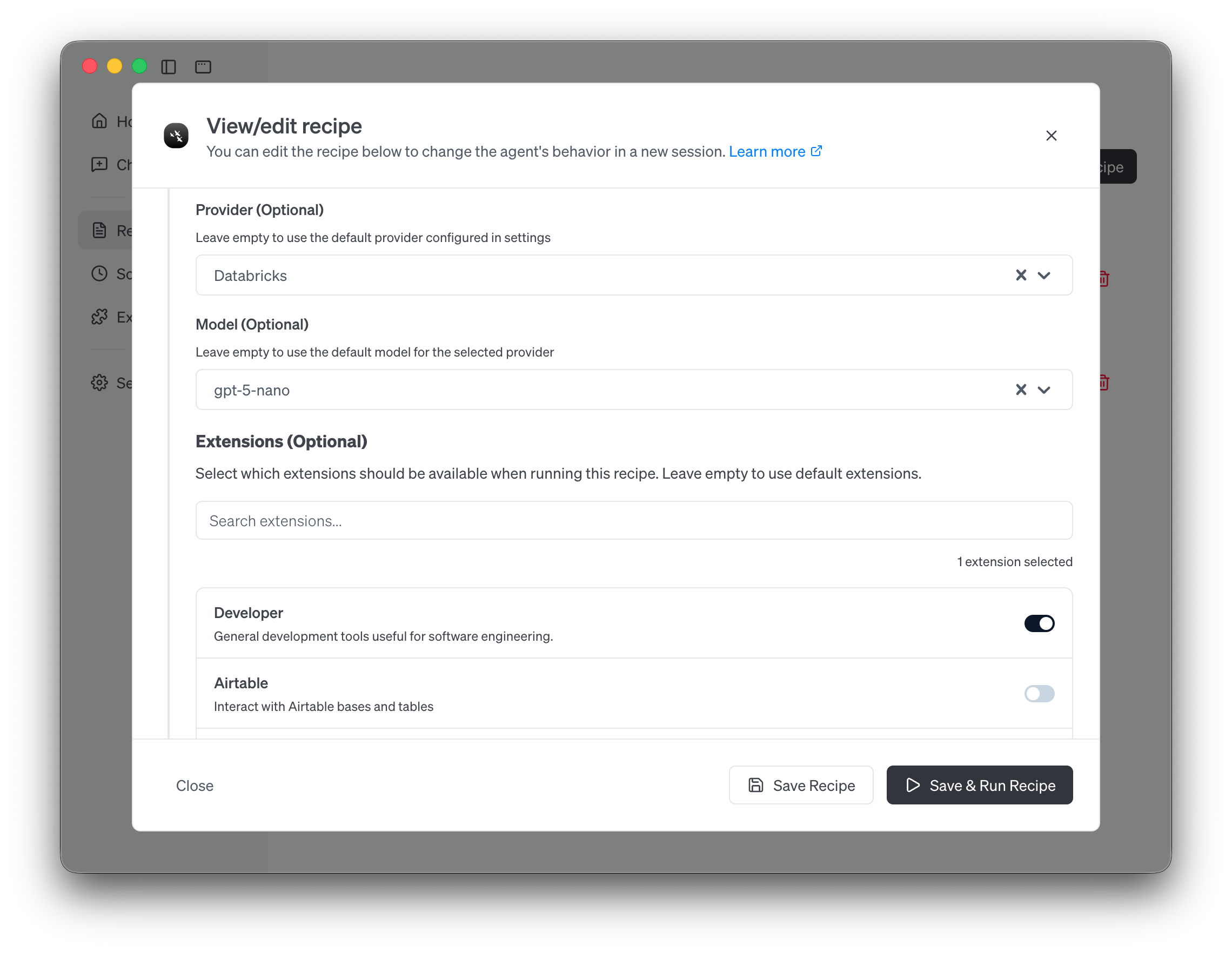
You can now edit a recipe's model, provider, and extensions directly in goose Desktop. No YAML editing required.
Recipes already let you define reusable workflows with specific instructions, extensions, and configurations, and you could always edit the underlying YAML file. But switching the model or provider for a recipe meant hunting down the right field in the config file.
With v1.25.0, the desktop app lets you visually configure these settings per recipe:
- Change the model and provider a recipe uses
- Add or remove extensions
- Save and run the updated recipe immediately
Alongside this, the recipe details view now correctly displays the provider and model specified in the recipe's own config, rather than showing your global default. This means if you have a code review recipe set to always run on Claude Sonnet, the UI will accurately reflect that, regardless of your default provider setting.
🤖 Agentic CLI Providers Level Up
Claude Code, Codex, and Gemini CLI all received major upgrades in this release.
goose's agentic CLI providers, which delegate work to other AI coding agents, got a batch of improvements that make them significantly more capable:
MCP Extensions Now Work with Agentic Providers
This is a big one. Previously, MCP extensions only worked with standard API-based providers. Now, Claude Code, Codex, and Gemini CLI can all use MCP extensions.
Under the hood, goose converts your extension configurations into the native format each CLI expects:
- Claude Code gets
--mcp-configJSON - Codex gets
-c mcp_servers.*TOML overrides
This means you can use the same MCP extensions regardless of which provider you're using.
Claude Code Streaming
Claude Code now streams its output in real-time instead of waiting for the complete response. You'll see results appearing as Claude Code works, making long-running tasks feel much more responsive.
Claude Code Dynamic Model Switching
You can now list available models and switch models mid-session when using Claude Code. No need to restart your session just because you want to switch from Sonnet to Haiku for a simpler task.
Gemini CLI Stream-JSON and Session Reuse
The Gemini CLI provider now uses stream-json output for better real-time feedback and re-uses sessions for improved efficiency across multiple interactions.
✨ Streaming Markdown in the CLI
Markdown rendering in the CLI now streams intelligently instead of rendering partial, broken output.
If you've ever seen half a bold tag or a broken code block flash on screen while goose is streaming a response, this fix is for you. The new MarkdownBuffer introduces a state machine parser that tracks open markdown constructs (bold, code blocks, links, etc.) and only flushes content to the terminal when constructs are complete.
The result: smooth, properly formatted markdown that renders progressively without visual glitches.
🛡️ SLSA Build Provenance
Every goose release artifact now comes with a signed provenance attestation.
Supply chain security matters. Starting with v1.25.0, every CLI binary, desktop bundle, Linux package, and Docker image gets a SLSA (Supply Chain Levels for Software Artifacts) build provenance attestation via Sigstore.
This means you can cryptographically verify that any goose artifact was built from the official repository by the official CI pipeline:
gh attestation verify <artifact> --repo block/goose
The implementation covers all release workflows including stable releases, canary builds, nightly builds, and Docker images, with properly pinned actions and correct permission scoping.
Get Started
Ready to try v1.25.0? Head over to our updating goose guide for step-by-step instructions on getting the latest version for Desktop or CLI.
Check out the full release notes for the complete list of changes, and join the conversation in GitHub Discussions.
goose is open source. Star us on GitHub, and if you build something cool with goose, we'd love to hear about it!